
New in DoorSpace: Group Enrollments, Redesigned Dashboard, and More

We are excited to share some significant updates to DoorSpace that are now live in your account. These changes are designed to give you better visibility into your enrollment activity, streamline how you manage payor relationships, and make it easier to find and export the data you need. Here is a summary of what is new.
A Redesigned Dashboard with More Reporting Power
Your Dashboard has a fresh new layout organized into two clear sections:
- Credential Items – your familiar Missing or Incomplete, Expiring, and Expired reports are still front and center, now with a Status column on the Missing or Incomplete Items report so you can see at a glance whether an item is Missing, Incomplete, or Expired.
- Payor Enrollments – a brand new section with Individual and Group tabs, giving you real-time visibility into enrollment activity across your organization. Each tab includes three reports:
- Incomplete Enrollments – enrollments that still need attention
- Enrollment Revalidations – upcoming and past-due revalidation dates
- Recently Approved Enrollments – enrollments that have been approved
Every report now includes a Download .csv button, so you can export any report to a spreadsheet for offline analysis, committee meetings, or compliance documentation.
Introducing Group Enrollments
The new Group Enrollments module (found under Organization in your left navigation menu) is built for how credentialing organizations actually manage payor relationships.
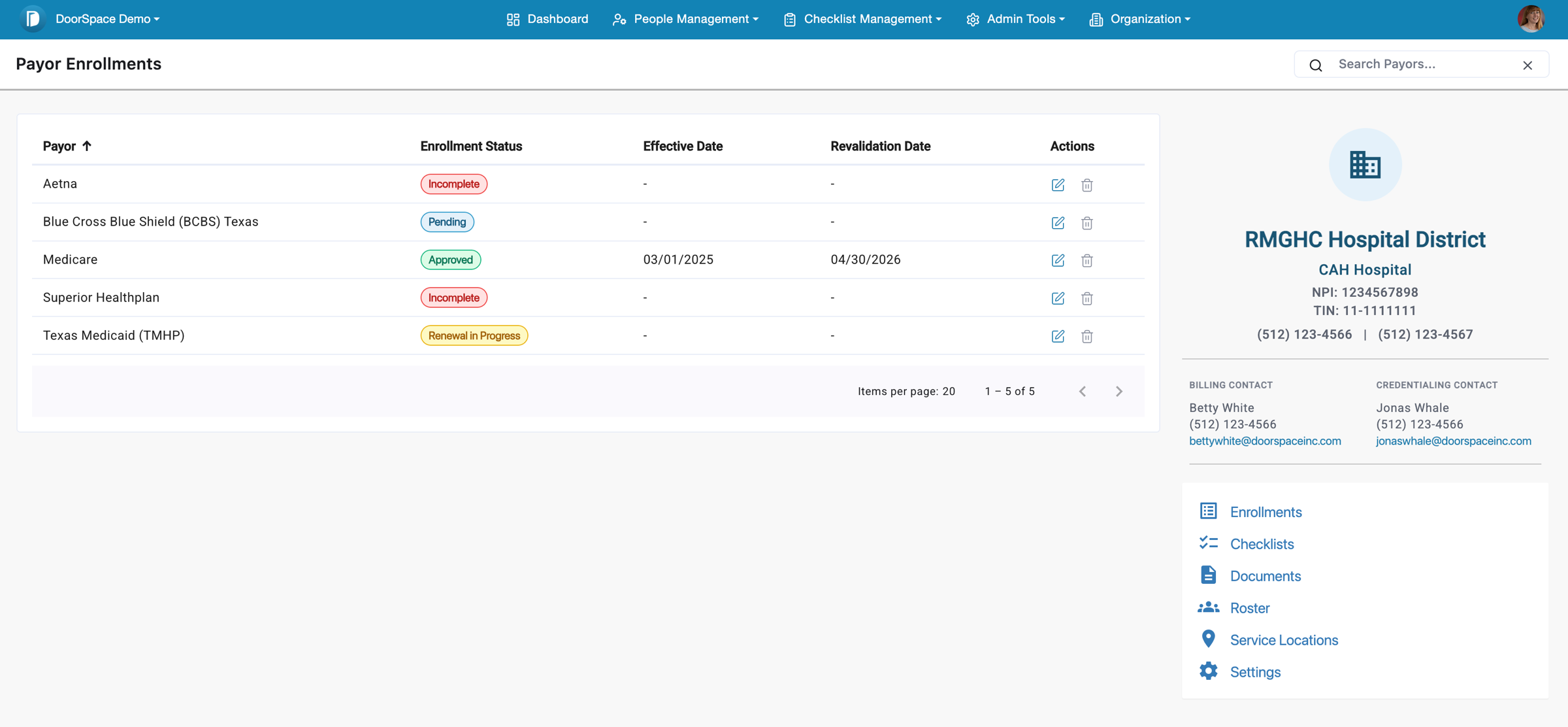
Here is what you can do:
- Create and manage Group NPIs – set up organizational provider identities with Type 2 NPI, TIN, contacts, licensing, identifiers, banking information, and multiple addresses.
- Track Payor Enrollments for each Group NPI – manage enrollment status, effective dates, revalidation dates, and application timelines all in one place.
- Add Enrollment Notes – document important details, communications, and follow-ups directly on each payor enrollment so your team always has context.
- Track Network and Plans – see which network plans are associated with each payor enrollment.
- Manage Documents and create Document Packets – view all documents related to a Group NPI in one place. Select multiple documents and combine them into a single PDF packet for enrollment submissions.
- Assign Practice Locations – link your facilities to each Group NPI to track which physical locations are covered.
- Manage Checklists – view assigned checklists and track the status of each checklist item for your Group NPI. Each Group NPI also automatically creates a linked Group Roster, making it easy to assign clinicians to the organizational provider identity they practice under.
Improved Payor Directory
The Payor Directory (now accessible under People Management) has been improved so that payors your organization is currently enrolled with appear at the top of the list, above the general directory. This makes it faster to find the payors you work with most.
Updated Navigation
You will notice a few changes to the navigation menu as part of this release:
- People Management now includes Staff Profiles, Rosters, and the Payor Directory
- Organization is a new menu section with Organization Info, Group Enrollments, and Facility Management
- Rosters is the new name for what was previously called User Groups
Everything you had access to before is still available – it has been reorganized to be easier to find as DoorSpace continues to grow.
We Are Here to Help You Get Started
We know these are meaningful changes, and we want to make sure your team is set up for success. We are offering complimentary training sessions for your administrators to walk through the new features, answer questions, and help you get the most out of these updates. Reach out to your DoorSpace Account Specialist to schedule your hospital’s training.
Thank you for being a DoorSpace customer. We are committed to building the tools that make credentialing and enrollment management easier for your team, and we are excited for you to explore what is new.
